
+86 18116360585
- English
- Chinese
- French
- German
- Portuguese
- Spanish
- Russian
- Japanese
- Korean
- Arabic
- Irish
- Greek
- Turkish
- Italian
- Danish
- Romanian
- Indonesian
- Czech
- Afrikaans
- Swedish
- Polish
- Basque
- Catalan
- Esperanto
- Hindi
- Lao
- Albanian
- Amharic
- Armenian
- Azerbaijani
- Belarusian
- Bengali
- Bosnian
- Bulgarian
- Cebuano
- Chichewa
- Corsican
- Croatian
- Dutch
- Estonian
- Filipino
- Finnish
- Frisian
- Galician
- Georgian
- Gujarati
- Hausa
- Hawaiian
- Hebrew
- Hmong
- Hungarian
- Icelandic
- Igbo
- Javanese
- Kannada
- Kazakh
- Khmer
- Kurdish
- Kyrgyz
- Latin
- Latvian
- Lithuanian
- Luxembou..
- Macedonian
- Malagasy
- Malay
- Malayalam
- Maltese
- Maori
- Marathi
- Mongolian
- Burmese
- Nepali
- Norwegian
- Pashto
- Persian
- Punjabi
- Serbian
- Sesotho
- Sinhala
- Slovak
- Slovenian
- Somali
- Samoan
- Scots Gaelic
- Shona
- Sindhi
- Sundanese
- Swahili
- Tajik
- Tamil
- Telugu
- Thai
- Ukrainian
- Urdu
- Uzbek
- Vietnamese
- Welsh
- Xhosa
- Yiddish
- Yoruba
- Zulu
- Kinyarwanda
- Tatar
- Oriya
- Turkmen
- Uyghur


A digital torque wrench can display live torque and warn the operator with a buzzer or LED light, but these features do not automatically prevent over-tightening. In a noisy factory, the buzzer may be difficult to hear. In bright outdoor work, the LED may be less visible. If the operator pulls too quickly, the applied torque may continue rising after the warning begins. This matters to automotive workshops, industrial assembly lines, equipment manufacturers and OEM tool buyers that expect electronic feedback to improve tightening consistency. The correct solution is not simply choosing the model with the loudest alarm. Buyers should match the torque range, alert sequence, display visibility, head configuration and verification process to the real working environment. This article follows one fastening cycle from setup to completion and shows where a digital torque wrench can still fail.
The Eight Seconds That Decide Whether a Fastener Is Correct
Consider a typical assembly task.
The operator selects 80 N·m, installs the socket and starts pulling the handle. The display rises through 45, 60 and 70 N·m. An LED begins flashing as the tool approaches the target. The buzzer sounds. The operator continues moving for a fraction of a second and finally stops at 86 N·m.
The tool worked as designed:
- It measured the applied torque.
- It displayed the live value.
- It warned the operator.
- It recorded or displayed the peak.
The fastener was still tightened above the intended value.
This illustrates an important difference:
A digital torque wrench can provide information, but the operator and fastening process must still respond correctly.
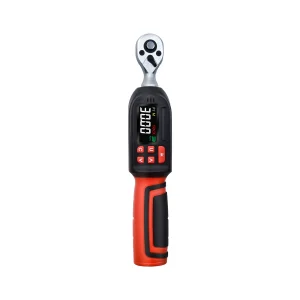
YouBar’s digital torque wrench range uses a high-contrast display, audible buzzer and LED flash alerts to warn operators as the target torque is approached. The listed ratchet and interchangeable-head models state approximately ±2% clockwise accuracy. (youbartools.com)
These features can improve control, but the final result still depends on:
- Pulling speed
- Operator reaction time
- Alert timing
- Handle position
- Joint friction
- Tool range
- Head geometry
- Fastener accessibility
Before the Pull: Was the Correct Torque Range Selected?
Many tightening errors begin before force is applied.
A buyer may select a 20–200 N·m digital torque wrench because the required 25 N·m value is technically inside the range. However, the target is very close to the lower end of the tool’s capacity.
This can create practical problems:
- The operator has less time to react.
- The target may be reached with very little handle movement.
- The large tool may be awkward around small components.
- The drive size may require additional adapters.
- The tool may be heavier than necessary.
- The display resolution may appear precise without improving process control.
A lower-range tool may be more suitable for:
- Bicycle components
- Electronics
- Small engines
- Sensor housings
- Light mechanical assemblies
A higher-range tool may be required for:
- Automotive suspension
- Wheel fasteners
- Industrial machinery
- Large flanges
- Heavy equipment
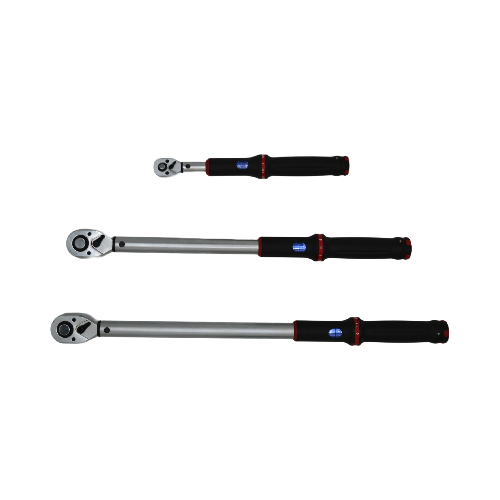
YouBar offers digital torque wrench sets in 1/4-inch, 3/8-inch and 1/2-inch configurations. The sets are intended for different torque ranges and application sizes rather than treating one drive size as a universal solution. (youbartools.com)
A practical selection rule
Choose a wrench whose normal working range places the most frequently used torque values comfortably inside the range—not only below the maximum value.
For an OEM or workshop order, provide the supplier with:
- Minimum required torque
- Maximum required torque
- Most frequently used setting
- Fastener size
- Drive size
- Daily tightening cycles
As Torque Builds: Can the Operator See the Display?
A digital display is useful only when the operator can view it during the tightening motion.
Display visibility may be reduced when:
- The fastener is behind machinery
- The operator works below a vehicle
- The handle faces away from the operator
- The tool is used inside a cabinet
- Bright sunlight washes out the screen
- Oil or dirt covers the display
- The operator wears a face shield
- The tool is used at an awkward angle
In these situations, the operator may rely almost entirely on the buzzer or LED.
That is why display size alone should not determine product selection. Buyers should also evaluate:
- Viewing angle
- Backlight
- Contrast
- Button layout
- Unit indication
- Battery-status visibility
- Peak-value retention
- Whether the display can be read with gloves
A ratchet-head model may provide a suitable viewing position for accessible bolts. A specialized fitting may require a different handle and head orientation.
Buyers can review YouBar’s ratchet digital torque wrench for conventional socket-based automotive and industrial fastening.
The Pre-Alert Stage: Does the Warning Begin Early Enough?
A useful digital torque wrench should not wait until the exact target value before providing the first warning.
Operators need time to:
- Recognize the approaching target
- Reduce pulling speed
- Stabilize the handle
- Stop applying force
If the operator pulls rapidly, the torque can continue rising during this reaction period.
The result depends on both tool configuration and operator behavior.
Slow, controlled approach
The operator reduces speed as the warning begins. The final peak remains close to the target.
Fast, continuous pull
The operator maintains the same speed until the final alarm. The tool may show that the target was exceeded even though the alert worked.
Stop-and-start tightening
The operator repeatedly releases and reapplies force near the target. This may create inconsistent results and make it difficult to interpret peak readings.
A suitable work instruction should define:
- Where the pre-alert begins
- Which signal means “approaching”
- Which signal means “target reached”
- Whether the operator must stop immediately
- What happens after an over-torque event
- Whether the fastener can be reused or must be inspected
The digital wrench should be treated as part of the work instruction, not as a replacement for one.
When the Buzzer Sounds: Can It Be Heard in the Real Workplace?
A buzzer that is clear in a quiet office may be difficult to hear beside:
- Impact tools
- Compressors
- Engines
- Punching machines
- Grinding equipment
- Ventilation systems
- Construction machinery
This does not make audible feedback useless. It means that audible feedback should not be the only signal in a noisy workplace.
YouBar’s digital products combine the buzzer with LED flash alerts and a live display rather than relying on a single warning channel.
For noisy environments, buyers should ask:
- Is there a visual pre-alert?
- Does the LED change as the target approaches?
- Is the final signal different from the early warning?
- Can the peak value remain on screen?
- Can the operator identify an over-torque result?
- Is vibration feedback required?
- Can the tool be verified without relying on sound?
A single alarm can be missed. Multiple coordinated signals give the operator more opportunities to respond.
When the LED Flashes: Is the Light Actually Visible?
LED alerts can also fail as a communication method when:
- The operator is not looking toward the tool
- The light is covered by the hand
- Strong sunlight reduces contrast
- The tool is used beneath equipment
- The operator is focused on the fastener
- Protective equipment limits peripheral vision
The location of the LED matters.
An indicator placed only near the display may be difficult to see when the display faces away from the operator. A light bar visible from several angles may perform better in some assembly stations.
Before ordering an industrial digital torque wrench, test the tool in the actual position used by operators.
A sample evaluation should include:
- Normal workshop lighting
- Bright outdoor lighting
- Low-light maintenance areas
- Gloves
- Ear protection
- Restricted fastener access
- Left- and right-handed use
Do not evaluate alert visibility only while holding the tool directly in front of the face.
After the Alert: Why Does Torque Continue Rising?
Torque does not automatically stop increasing when the buzzer starts.
The operator’s hand, arm and body are already moving. The wrench handle may continue rotating until the operator reacts.
Overshoot becomes more likely when:
- Pulling speed is high
- The handle is long
- The target torque is low
- The operator uses excessive body weight
- The fastener turns suddenly
- The joint has low friction
- The tool is used at an awkward angle
- The operator is unfamiliar with electronic feedback
A digital tool can show this overshoot through its peak reading, which is valuable because the problem becomes visible.
However, the shop must define what to do with that information.
Possible responses include:
- Accept the result within a permitted tolerance
- Loosen and repeat according to the approved procedure
- Replace the fastener
- Inspect the joint
- Record the event
- Quarantine the tool if repeated overshoot occurs
- Retrain the operator
The correct action depends on the product, fastener and quality plan.
Track Mode and Peak Mode Answer Different Questions
Many digital torque tools use some form of live or retained measurement.
Track mode
Track mode displays the torque currently being applied.
It helps the operator see the value rising and reduce speed before reaching the target.
Peak mode
Peak mode retains the highest torque reached during the cycle.
It helps answer:
What was the maximum torque actually applied?
These modes should not be treated as competing features.
Track mode supports operator control during tightening. Peak mode supports checking after the pull.
Google already contains many basic explanations of Peak and Track modes, so this article does not repeat a general button-by-button tutorial. Current guides commonly define Track as live torque and Peak as the retained maximum value.
For industrial use, the more important questions are:
- Does the operator need live guidance?
- Does the supervisor need a retained result?
- Must the value be recorded?
- How is an over-torque result identified?
- Does the tool reset automatically?
- Can stored records be linked to a job or product?
Interchangeable Heads Change More Than Accessibility
An interchangeable-head digital torque wrench allows the same electronic handle to work with:
- Open-end inserts
- Box-end inserts
- Ratchet heads
- Crowfoot heads
- Flare-nut heads
- Custom industrial heads
This is valuable for pipe fittings, hydraulic connections and confined industrial assemblies.
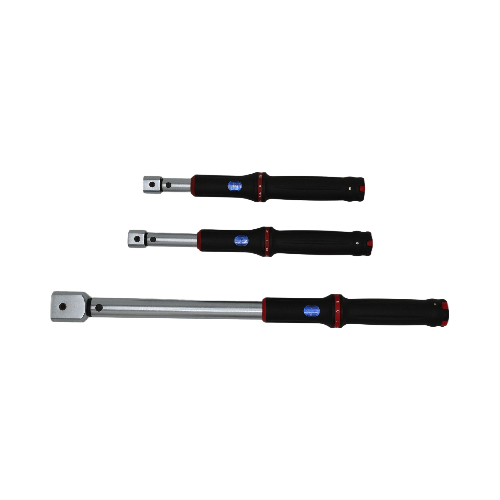
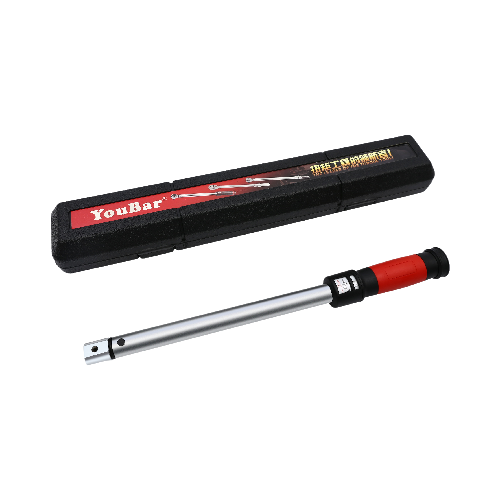
YouBar’s interchangeable-head digital torque wrench is designed for use with open-end, box-end and flare-nut-style inserts.
Buyers can also review the full range of interchangeable torque wrench heads.
However, changing the head can affect:
- Effective wrench length
- Balance
- Display orientation
- Required correction
- Maximum permitted torque
- Operator hand position
- Access to the LED and buttons
A longer inline head may change the torque applied at the fastener unless the wrench setting is corrected according to the approved method.
An OEM order should therefore identify:
- Insert interface
- Head type
- Opening size
- Center-to-center length
- Maximum torque
- Intended orientation
- Required correction instructions
A Digital Display Does Not Verify the Joint
A digital torque wrench measures torque at the tool. It does not directly confirm that the joint achieved the intended clamp force.
The same indicated torque can produce different fastener tension when:
- Threads are lubricated
- Coatings differ
- Washers change
- Surfaces are contaminated
- Fasteners are reused
- The joint has not seated
- The tightening sequence changes
The tool can control one variable accurately while the joint result remains inconsistent.
That is why a production fastening process should define:
- Fastener grade
- Surface condition
- Lubrication
- Washer type
- Tightening sequence
- Target torque
- Permitted variation
- Rework procedure
Digital feedback improves visibility. It does not replace joint engineering.
Calibration and Daily Verification Are Different Controls
ISO 6789-1:2017 covers conformance testing and marking requirements for hand torque tools, while ISO 6789-2:2017 covers calibration and the determination of measurement uncertainty.
A calibration certificate records how the wrench performed during a controlled test.
It does not confirm that the tool has remained unchanged after:
- A drop
- Overload
- Battery leakage
- Heavy production use
- Head damage
- Repair
- Improper storage
A separate draft ISO work item also addresses interim performance verification between formal calibrations, showing that calibration and routine checks serve different purposes.
A practical control plan may include:
- Formal scheduled calibration
- Functional checks before a shift
- Verification after impact
- Verification after repair
- Comparison against a torque tester
- Serial-number records
- Battery inspection
- Quarantine of suspect tools
Match the Tool to the Station, Not Only the Torque Number
Use this selection matrix when planning an OEM or industrial purchase:
| Working condition | Features to prioritize |
|---|---|
| Noisy factory | Strong visual alert, retained peak value and clear over-torque indication |
| Bright outdoor work | High-contrast screen and clearly visible LED positioning |
| Restricted space | Interchangeable head and readable display orientation |
| High-volume line | Preset target, simple controls, durable buttons and interim verification |
| Bicycle/electronics | Low torque range and 1/4-inch drive |
| Automotive service | 3/8-inch or 1/2-inch drive and wide socket compatibility |
| Industrial fittings | Open-end or flare-nut interchangeable heads |
| Multi-country distribution | Multiple torque units and localized instructions |
| Quality-controlled assembly | Serial number, certificate and record-management options |
A digital torque wrench should solve the actual station problem:
- Seeing the value
- Hearing or seeing the warning
- Reaching the fastener
- Stopping in time
- Confirming the peak
- Recording the result
What Should Buyers Put in a Digital Torque Wrench RFQ?
Provide the following information:
| RFQ item | Details to provide |
| Application | Automotive, assembly line, pipeline, machinery, bicycle or electronics |
| Torque range | Minimum, maximum and most-used value |
| Drive size | 1/4, 3/8, 1/2, 3/4 or 1 inch |
| Accuracy | Required percentage and direction |
| Feedback | Display, buzzer, LED or vibration |
| Working mode | Live, peak, preset warning or data recording |
| Environment | Noise, lighting, dust, moisture and temperature |
| Head type | Ratchet, open end, box end, flare nut or interchangeable |
| Units | N·m, lbf·ft, lbf·in or kgf·cm |
| Daily cycles | Estimated fastening cycles per shift |
| Documentation | Test report or calibration certificate |
| Identification | Serial number, label and batch traceability |
| Packaging | Carry case, retail packaging or industrial kit |
| Branding | Logo, colors, labels and manual |
| Quantity | Sample, trial order or annual volume |
| Destination | Country and port |
Which YouBar Digital Torque Wrench Format Fits the Application?
Ratchet Digital Torque Wrench
Suitable for:
- Automotive repair
- General machinery
- Socket-based fastening
- Maintenance workshops
Review the ratchet digital torque wrench for a standard ratchet configuration with display, buzzer and LED alerts.
Interchangeable-Head Digital Torque Wrench
Suitable for:
- Hydraulic fittings
- Pipelines
- Flare nuts
- Restricted industrial spaces
- Open-end fastening
Review the interchangeable-head digital torque wrench.
Digital Torque Wrench Set
Suitable for:
- Distributors
- Automotive tool kits
- Bicycle service
- Multi-size maintenance
- Private-label retail programs
YouBar’s digital torque wrench setsinclude 1/4-inch, 3/8-inch and 1/2-inch configurations.
Frequently Asked Questions
Can an operator still over-tighten with a digital torque wrench?
Yes. The operator may continue pulling after the alert begins, particularly when applying force too quickly.
Is a buzzer enough in a noisy workshop?
Not always. A combination of audible, visual and retained peak feedback is more reliable than sound alone.
What is the difference between an alert and torque control?
The alert informs the operator. The operator must still reduce force and stop the tightening motion.
Is Peak mode better than Track mode?
Neither is universally better. Track supports live control, while Peak records the highest applied value.
Do LED lights guarantee that the operator sees the warning?
No. Visibility depends on lighting, tool orientation, hand position and the operator’s line of sight.
Can interchangeable heads affect the torque result?
Yes. Heads that change the effective wrench length may require a corrected setting.
Does a digital torque wrench need calibration?
Yes. Digital measurement does not remove the need for calibration and periodic verification.
Is a smaller torque range better?
A smaller range can provide better usability when the required values are close to the lower limit of a larger wrench.
Design the Warning Around the Operator
A digital torque wrench should not be selected only by accuracy, maximum torque or display size.
The buyer should evaluate the complete warning process:
- Can the operator see the live value?
- Does the pre-alert begin early enough?
- Can the warning be heard in the actual noise level?
- Is the LED visible from the working angle?
- Can the operator stop before overshooting?
- Is the peak value available for verification?
- Does the head configuration change the lever length?
- Can the tool be checked between calibrations?
When requesting a quotation, send YouBar:
- Required torque range
- Drive size
- Accuracy
- Working environment
- Alert requirements
- Head type
- Daily cycle count
- Certification needs
- OEM branding
- Quantity
- Destination market
Contact YouBar Tools to request a ratchet, interchangeable-head or digital torque wrench set recommendation for your industrial, workshop or private-label program.
Previous News
Why Torque Wrench Accuracy Is Not the Whole StoryNext News
How Should Industrial Buyers Choose a Digital T...Feature Product
-
 XS Series Interchangeable Head Window Style Cli...
TENGTUO ELECTRONIC TECHNOLOGY Item NO...
-
 XS Series Window Style Click Torque Wrench
TENGTUO ELECTRONIC TECHNOLOGY Item NO...
-
 SL Series Interchangeable Head Window Style Cli...
TENGTUO ELECTRONIC TECHNOLOGY item NO...