
+86 18116360585
- Chinese
- French
- German
- Portuguese
- Spanish
- Russian
- Japanese
- Korean
- Arabic
- Irish
- Greek
- Turkish
- Italian
- Danish
- Romanian
- Indonesian
- Czech
- Afrikaans
- Swedish
- Polish
- Basque
- Catalan
- Esperanto
- Hindi
- Lao
- Albanian
- Amharic
- Armenian
- Azerbaijani
- Belarusian
- Bengali
- Bosnian
- Bulgarian
- Cebuano
- Chichewa
- Corsican
- Croatian
- Dutch
- Estonian
- Filipino
- Finnish
- Frisian
- Galician
- Georgian
- Gujarati
- Haitian
- Hausa
- Hawaiian
- Hebrew
- Hmong
- Hungarian
- Icelandic
- Igbo
- Javanese
- Kannada
- Kazakh
- Khmer
- Kurdish
- Kyrgyz
- Latin
- Latvian
- Lithuanian
- Luxembou..
- Macedonian
- Malagasy
- Malay
- Malayalam
- Maltese
- Maori
- Marathi
- Mongolian
- Burmese
- Nepali
- Norwegian
- Pashto
- Persian
- Punjabi
- Serbian
- Sesotho
- Sinhala
- Slovak
- Slovenian
- Somali
- Samoan
- Scots Gaelic
- Shona
- Sindhi
- Sundanese
- Swahili
- Tajik
- Tamil
- Telugu
- Thai
- Ukrainian
- Urdu
- Uzbek
- Vietnamese
- Welsh
- Xhosa
- Yiddish
- Yoruba
- Zulu
- Kinyarwanda
- Tatar
- Oriya
- Turkmen
- Uyghur


A 1/2-inch electronic torque wrench set should be evaluated as a tightening system, not by the “12-piece” count or ±2% headline alone. Match the wrench to the real joint torque range, confirm socket and head compatibility, define how clockwise and counter-clockwise work will be controlled, and verify the evidence behind the accuracy claim. Then review the preset, alarm, display, data-storage and kit functions against the operator workflow before comparing quotations.
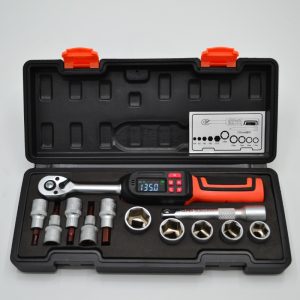
The current Youba 12-piece 1/2-inch digital set combines a digital wrench with audible and visual alerts, Peak and Track modes, preset torque values, multiple units, a color display, button lock and data storage. Those features create useful control options, but each one only adds value when it matches the buyer’s process. A project specification should therefore describe the joints and acceptance method before it describes the desired screen or alarm.
Start With the Joint Range and the 1/2-Inch Tooling Environment
The first selection question is not whether the wrench has a 1/2-inch drive. It is whether the complete 1/2-inch tooling chain fits the application. The buyer should list the sockets, extensions, adapters and fastener sizes used on the target equipment, then identify the minimum and maximum torque values that must be controlled.
A wrench that physically accepts the socket can still be a poor fit if the working range, access space or adapter arrangement is wrong. Long extensions, universal joints or stacked adapters can change access and handling, and an incorrect square-drive adapter can introduce play or an unexpected weak point. For projects with mixed tooling, the site’s 1/2-inch digital torque wrench setup guide provides a useful compatibility reference.
Buyers comparing the broader torque wrench set category should therefore define the application first: target torque range, fastener access, working direction, socket system, number of stations, shift pattern and whether tightening records must be retained. That information is more useful than starting from kit size.
What the 12-Piece Digital Set Actually Adds to the Workflow
The current product page lists clockwise and counter-clockwise operation, a 72-tooth ratchet, Peak and Track working modes, ten preset torque positions from P0 to P9, audible and visual warning when the set torque is reached, switching among N·m, ft·lb, in·lb and kg·cm, a color screen, a button-lock function and data storage. It also states a ±2% accuracy claim.
These features affect different parts of the job. Some help the operator approach the target; some reduce setup mistakes; some support repeated work; and some can help with traceability. Treating them as one general “digital” advantage makes supplier comparisons weaker because two electronic wrenches can have similar displays while supporting very different workflows.
| Feature | Procurement Value | What to Verify Before Approval |
| 1/2-inch drive and 72-tooth ratchet | Connects the wrench to common 1/2-inch socket tooling and affects movement in restricted access. | Socket inventory, adapter use, clearance and fastener-access conditions. |
| ±2% stated accuracy | Defines a headline measurement claim for the offered wrench. | Direction, tested range, calibration or conformance evidence, and the acceptance method for the order. |
| Peak / Track modes | Supports different ways of viewing applied torque during tightening. | Which mode the work instruction requires and what operators should read or record. |
| P0–P9 presets | Can reduce repeated manual target entry across recurring joints. | Preset assignment, change control, lockout of unintended edits and operator instructions. |
| Buzzer and LED alert | Provides an operator cue near the target torque. | How the alert behaves, what threshold the project uses and whether the cue is usable in the real work environment. |
| Four torque units | Allows work instructions to use the project’s required unit without manual conversion. | Approved unit, display convention and prevention of accidental unit changes. |
| Button lock | Can help protect settings during repetitive work. | Which functions remain locked and how supervisors intentionally change the setup. |
| Data storage | Can support traceability when records are part of the quality plan. | Memory capacity, stored fields, retrieval method, export capability and how records identify the joint or tool. |
Accuracy Is a System Requirement, Not a Standalone Percentage
The ±2% figure is an important selection input, but it does not answer every acceptance question. A buyer needs to know the direction, torque points, test method and document that support the ordered tool. If a project works in both directions, the acceptance requirement should say so. If the tool will spend most of its life around a defined torque window, incoming verification should reflect that working range rather than an unrelated single point.
ISO 6789 is useful here because it separates two ideas that are often mixed together in quotations. Part 1 addresses conformance testing and marking requirements for hand torque tools, while Part 2 addresses calibration and measurement uncertainty. The published 2017 editions remain current standards while revisions are under development. For procurement, the practical point is that a declaration of conformance and a calibration certificate are not automatically the same evidence.
The buyer should state which evidence is required and how it must be linked to the delivered wrench or batch. This avoids a familiar dispute: the product page states an accuracy percentage, the supplier sends a generic document, and incoming inspection expects model- or serial-specific results that were never included in the quotation.
Peak and Track Modes Should Match the Work Instruction
Electronic tools are often purchased for their display and alarms, but the operator still needs a defined mode. Track mode is useful when the process needs a live view of applied torque. Peak mode is useful when the user needs the highest torque reached during the tightening event to remain available for review. Neither mode is better in isolation.
A buyer should therefore include the intended operating mode in the sample trial. Ask operators to perform the actual joint sequence and confirm that the display remains readable, the value is interpreted correctly and the mode does not encourage overshoot. If a work instruction requires a retained final value, verify how that value is cleared before the next joint so one reading is not mistaken for another.
This is where a digital tool can add workflow value without replacing process discipline. The mode helps the operator see torque information; it does not decide the correct target, socket or tightening sequence.
Presets and Button Lock Matter Most in Repetitive Assembly
Ten preset positions can be useful when a station repeats a small number of approved torque values. Instead of re-entering a target for every product change, the operator can move between stored settings. That can shorten changeover and reduce transcription mistakes, but only if the preset list is controlled.
Procurement should ask how presets are created, selected, locked and changed. A supervisor may want operators to choose among approved presets while preventing unplanned edits. The product page lists a button-lock function, but the buyer still needs to verify which controls it protects and whether the lock behavior matches the site’s work instructions.
If different departments use different torque units, the four-unit display can reduce manual conversion. The same feature can also create risk if an operator changes units unintentionally. The sample acceptance test should therefore include unit selection and lock behavior, not only torque output.
Buzzer and LED Alerts Are Operator Cues, Not Proof of Joint Quality
An audible and visual alert can help in noisy or visually busy work, especially when the operator cannot continuously watch the screen. It is still a cue generated by the tool. It does not prove that the correct socket was fitted, that the joint started in the correct condition, or that the final fastener state satisfies the engineering requirement.
The useful procurement question is how the alert fits the task. Is the buzzer audible in the actual workshop? Can the LED be seen from the working angle? Does the warning occur early enough for the operator to approach the target smoothly? What happens if the target is exceeded? Those questions are better answered in a sample trial than from a brochure line.
Alert behavior should also be written into training. If one production line interprets the first warning as “stop now” while another treats it as “approaching target,” the same hardware can create different tightening behavior.
Data Storage Only Helps When the Record Can Be Used
The product page states that the wrench has a data-storage function. That is a useful starting point for buyers who need traceability, but “data storage” is not yet a complete quality requirement. The project should define what information must be retained and how it will be reviewed.
Ask what each stored record contains, how many records are retained, whether old records are overwritten, how data is retrieved, whether export is supported and how a record is linked to a tool, operator, workstation or joint. If the application only needs operator guidance and no tightening record, those functions may be less important than fast preset changes and clear alerts.
This trade-off is common in electronic-tool purchasing: a feature may be valuable in a controlled assembly system and unnecessary in a maintenance kit. The correct set is the one whose data workflow matches the buyer’s actual quality plan.
The 12-Piece Count Should Be Checked Against the Real Fastener Mix
A larger kit is attractive because it looks complete, but piece count is only useful when the included heads and accessories match the equipment being serviced. The current 12-piece 1/2-inch digital torque wrench set is positioned as a multi-piece configuration around the digital wrench. Before approving it, compare the actual kit contents with the buyer’s socket, head and fastener list.
This matters for both cost and tool control. If several pieces are never used, the kit is not automatically a better value. If a required head is missing, users may add an uncontrolled adapter later. For fleet maintenance or multiple workstations, buyers should also check whether replacement inserts and accessories can be ordered separately so a lost component does not force replacement of the complete set.
Sample Approval Should Reproduce the Production Workflow
A sample test should use the intended sockets or heads, actual target torque values, required direction, selected mode, preset logic and alarm behavior. If the project relies on stored data, include record creation and retrieval in the test. If the button lock is meant to prevent setup changes, try the actions an operator could accidentally perform and confirm the lock behaves as expected.
The acceptance record should identify the exact wrench configuration and the evidence reviewed. That baseline makes repeat orders easier because purchasing can ask whether the next batch matches the approved model, kit contents, operating behavior and document package instead of restarting the evaluation from a product photo.
Accuracy verification should also be planned before shipment. Buyers that require calibration or project-specific test records should put those documents in the RFQ, including any identification or traceability requirement. Adding that requirement after production can change cost and delivery timing.
Build the RFQ Around the Workstation, Not the Feature List
For a reviewable quotation, provide the target torque range, working direction, 1/2-inch socket and adapter requirements, fastener access conditions, quantity, intended Peak or Track mode, preset requirements, alert expectations, data-retention need, working unit, calibration or conformance documentation, inspection plan, packing requirement and delivery target. If the set will be used across multiple stations, include the number of stations and whether each requires the same kit contents.
Ask the supplier to return the exact quoted set configuration, included pieces, stated accuracy basis, document scope, any optional components and any deviation from the requested workflow. Technical scope should be aligned before unit price and lead time are compared. Buyers can submit the project data through Youba’s RFQ and project inquiry form for a configuration-based quotation.
Previous News
How Should Buyers Evaluate the XS Series for 1/...Next News
How Should Buyers Select a Non-Digital Fixed-Va...Feature Product
-
 XS Series Interchangeable Head Window Style Cli...
TENGTUO ELECTRONIC TECHNOLOGY Item NO...
-
 XS Series Window Style Click Torque Wrench
TENGTUO ELECTRONIC TECHNOLOGY Item NO...
-
 SL Series Interchangeable Head Window Style Cli...
TENGTUO ELECTRONIC TECHNOLOGY item NO...